 CollectorCtrl
Telemetry Command Center & Dynamic Destination Routing
Central Control Plane
Dynamic Destination Router & Lakehouse SQL Analytics
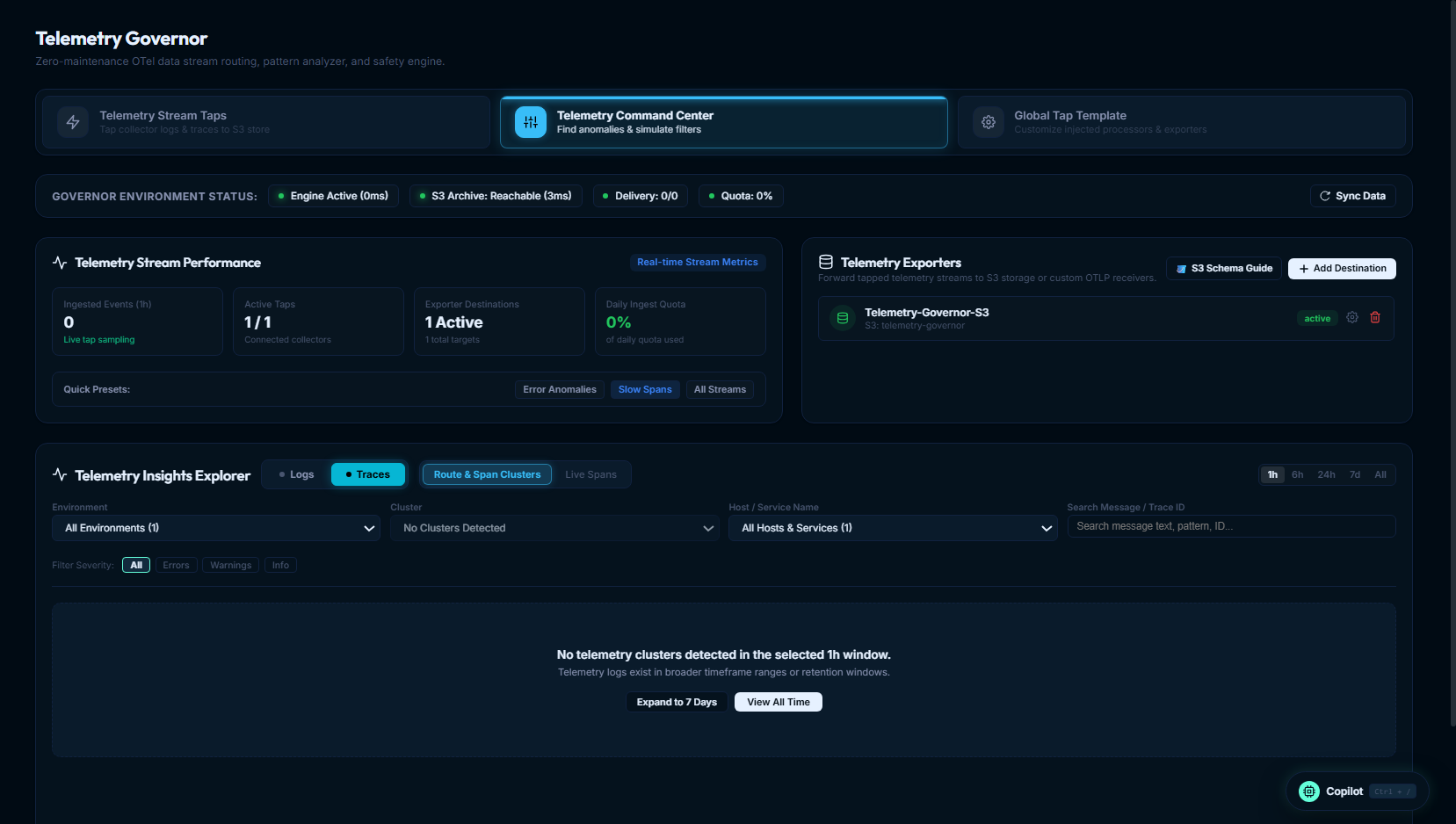
The Telemetry Command Center provides centralized fleet visibility, live event throughput monitoring, and real-time destination fan-out management for all tapped telemetry across your infrastructure.
Operating directly on aggregated 1-minute pattern rollups backed by a transient 1 to 7-day hot store, the Command Center gives you deep pattern insights and APM observability without requiring permanent raw telemetry storage. After the transient retention window, raw records are discarded automatically—unless you explicitly route them to an S3 Data Lake or external OTLP endpoint.
 Expand
1. Overview of the Command Center
From this single operational console, platform engineers and SREs can:
- Slice & Dice Across Fleet Hierarchy: Filter telemetry patterns by environment, service, error fingerprint, or drill down to an individual collector instance. This makes it easy to identify single problematic collectors generating disproportionate noise or fragmented log lines.
- Generate Edge Remediations: Analyze recurring log patterns and fragmentation directly from the UI, then generate targeted OpenTelemetry configurations (such as OTTL statements or filter processors) to deploy back to the collector fleet.
- Monitor Real-Time Stream Throughput: Track live ingestion rates across logs, traces, and metrics, active collector tap counts, and ingest buffer status.
- Inspect Pipeline Health: Live telemetry engine indicators verify processing latency (
Engine Active 0ms), S3 bucket round-trip reachability (S3 Archive Reachable 3ms), and failed delivery queue status. - Manage Destination Fan-Out: Dynamically add, configure, test, and toggle forwarding destinations (e.g. S3 Parquet/JSONL or OTLP streams to AI SRE agents like HolmesGPT) without restarting collectors or redeploying agent binaries.
- Transient 1–7 Day Data Lifecycle: Summarized insights and raw transient records expire automatically, maintaining zero operational disk overhead.
2. Managing Telemetry Destinations
Telemetry Governor supports two primary destination architectures:
1. S3 Compatible Object Storage
Zero-maintenance analytical storage and audit retention using industry standard file formats and Hive partitioning.
- Dual Output Formats: Columnar Apache Parquet with Snappy compression or line-delimited JSON (
.jsonl.gz). - Hive Partitioning: Granular keys
year=YYYY/date=YYYY-MM-DD/tenant=...prevent costly full-bucket table scans. - Universal S3 Compatibility: Native support for AWS S3, MinIO, Cloudflare R2, Google Cloud Storage, and Ceph.
- Serverless Ad-Hoc SQL: Direct querying via AWS Athena, DuckDB, Trino, and Apache Spark with zero pipeline maintenance.
2. External OTLP / HTTP Endpoints
High-throughput secondary streaming to autonomous AI SREs, SIEM security pipelines, and columnar databases.
- AI Agent Push: Forward the tapped sample to AI agents (HolmesGPT, Claude, custom LangChain bots). Agents receive the uniform sample, not every record.
- Zero Vendor Disruption: Secondary fan-out occurs purely on the server plane—primary vendor pipelines remain untouched.
- Secure Auth & Custom Headers: Configurable Bearer tokens, API keys, and custom headers per forwarding destination.
- Atomic Routing: Activate, pause, or switch targets in milliseconds with instant in-memory cache invalidation.
Adding an S3 Data Lake Destination
1. Open Destination Dialog
In the Telemetry Exporters panel, click + Add Destination and select Amazon S3 / Compatible Object Storage.
2. Configure Bucket & Storage Credentials
Provide the storage details:
- Destination Name: e.g.
Production-S3-Lakehouse - Bucket Name: e.g.
my-telemetry-archive - AWS Region: e.g.
us-east-1 - Storage Prefix: e.g.
telemetry_governor/ - AWS Access Key ID & Secret Key: IAM credentials with
s3:PutObjectands3:HeadBucketpermissions. - Endpoint URL (Optional): Custom endpoint URL for MinIO, Cloudflare R2, Ceph, or LocalStack deployments.
3. Save Destination
Click Save Destination. The target appears in your exporters list in standby mode.
Adding an External OTLP Destination
1. Select OTLP Endpoint
Click + Add Destination and select OTLP / HTTP Endpoint.
2. Specify URL & Headers
- Destination Name: e.g.
Security-SIEM-BridgeorClickHouse-Vector - Endpoint URL: e.g.
https://siem-collector.corp.internal:4318/v1/logs - Custom Headers: Add bearer authentication or token headers (e.g.
Authorization: Bearer <token>).
3. Save Destination
Click Save Destination.
3. Dynamic Multi-Destination Fan-Out Controls
The Telemetry Exporters panel features real-time routing switches that decouple destination management from collector agent processes:
Interactive Routing Switch
Each destination card features an interactive toggle switch:
- Active State (Green Glow): Secondary telemetry is actively forwarded to this target in real time.
- Inactive State (Dark Standby): Target is in standby mode. No network calls or egress charges occur.
Instant In-Memory Cache Invalidation
When you toggle a destination switch, the server calls invalidateDestCache(). The very next telemetry batch from your fleet uses the updated routing rules immediately—no collector restarts, no config rollouts, and zero downtime.
Contextual Bulk Actions Toolbar
When managing multiple destinations, select the checkboxes next to any cards to reveal the bulk routing toolbar:
Route to Selected: Activates forwarding to all selected destinations while preserving other running targets.Stop Selected: Pauses forwarding to selected destinations.Route ONLY These: Exclusive routing switch—instantly activates selected targets and deactivates all others in a single atomic database operation.Route All/Stop All: Fleet-wide switches to activate or pause all destinations simultaneously.
4. Pre-Flight Connectivity Testing (⚡ Test)
Before routing production telemetry streams to an external target, click ⚡ Test on any destination card:
- For Amazon S3: Verifies AWS credentials, bucket existence, and write permissions by executing
HeadBucketand writing a transient zero-byte canary test object. - For OTLP Endpoints: Dispatches a synthetic OTLP ping payload with configured authorization headers, verifying reachability and reporting round-trip latency (e.g.
✓ Connected in 18ms). - Diagnostic Feedback: If network firewalls, IAM roles, or TLS certificates fail, a diagnostic message explains the root cause before live production data is routed.
5. S3 Lakehouse Partitioning & Athena SQL Queries
All telemetry persisted to Amazon S3 follows a standard Hive-style directory layout optimized for Amazon Athena, AWS Glue, and Apache Spark.
S3 receives the tapped sample: every severity at the tap rate (10% by default), not every record. Counts in Athena are counts within the sample. They compare fairly between patterns sampled at the same rate, but they are not total occurrences, and a rare error may not appear at all. Use your observability platform for complete error data.
s3://<YOUR_BUCKET>/telemetry_governor/
  schema_version=v1/
  tenant=<tenant_id>/
  environment=<environment>/
  year=YYYY/
  date=YYYY-MM-DD/
  hour=HH/
  signal=<logs|traces|metrics>/
  service=<service_name>/
  severity=<severity>/
  fingerprint=<stable_hash>/
  <agent_id>-<unix_nano>.jsonl.gz
AWS Athena External Table DDL
Execute this query in the Amazon Athena Query Editor to register the table with partition projection:
CREATE EXTERNAL TABLE IF NOT EXISTS telemetry_governor_logs (
  schema_version string,
  tenant_id string,
  environment string,
  agent_id string,
  signal string,
  received_at string,
  timestamp string,
  service_name string,
  severity_text string,
  severity_number int,
  body string,
  fingerprint string,
  attributes map<string, string>
)
PARTITIONED BY (
  schema_version_part string,
  tenant string,
  env string,
  year string,
  date string,
  hour string,
  signal_part string,
  service string,
  severity string,
  fingerprint_part string
)
ROW FORMAT SERDE 'org.openx.data.jsonserde.JsonSerDe'
STORED AS INPUTFORMAT 'org.apache.hadoop.mapred.TextInputFormat'
OUTPUTFORMAT 'org.apache.hadoop.hive.ql.io.HiveIgnoreKeyTextOutputFormat'
LOCATION 's3://<YOUR_BUCKET_NAME>/telemetry_governor/'
TBLPROPERTIES (
  'projection.enabled' = 'true',
  'projection.date.type' = 'date',
  'projection.date.range' = '2026-01-01,NOW',
  'projection.date.format' = 'yyyy-MM-dd',
  'projection.hour.type' = 'integer',
  'projection.hour.range' = '0,23',
  'projection.hour.digits' = '2',
  'storage.location.template' = 's3://<YOUR_BUCKET_NAME>/telemetry_governor/${schema_version_part}/tenant=${tenant}/environment=${env}/year=${year}/date=${date}/hour=${hour}/signal=${signal_part}/service=${service}/severity=${severity}/fingerprint=${fingerprint_part}'
);
Ready-to-Use Production SQL Queries
1. Most Frequent Error Fingerprints in the Production Sample (One Day)
occurrences counts records in the sample. Rows compare fairly with each other when the sources share one tap rate.
SELECT
  service_name,
  severity_text,
  fingerprint,
  body,
  COUNT(*) AS occurrences
FROM telemetry_governor_logs
WHERE env = 'production'
  AND date = '2026-09-22'
  AND severity = 'error'
GROUP BY service_name, severity_text, fingerprint, body
ORDER BY occurrences DESC
LIMIT 25;
2. Investigate 500-Error Spans & Exception Payloads
SELECT
  timestamp,
  service_name,
  body,
  attributes['http.status_code'] AS status_code,
  attributes['http.target'] AS endpoint,
  agent_id
FROM telemetry_governor_logs
WHERE date = '2026-09-22'
  AND attributes['http.status_code'] = '500'
ORDER BY timestamp DESC
LIMIT 100;
3. Direct Ad-Hoc Queries via DuckDB
You can also query the compressed .jsonl.gz files directly from your terminal using DuckDB without any cloud database cluster:
INSTALL httpfs;
LOAD httpfs;
SET s3_region='us-east-1';

SELECT
  timestamp,
  service_name,
  severity_text,
  body
FROM read_json_auto('s3://<YOUR_BUCKET>/telemetry_governor/schema_version=v1/tenant=default/environment=production/year=2026/date=2026-09-22/*/*/*/*/*.jsonl.gz')
WHERE severity_text = 'ERROR'
LIMIT 50;
6. AI Agents & Pattern Summaries (HolmesGPT / LangChain / Claude)
AI agents get the most from Telemetry Governor as a source of pattern summaries: which recurring log patterns and span routes dominate a service, how they trend, and which rule would reduce them.
What Governor gives an agent
- Ranked recurring patterns: Through the MCP server,
governor_top_patternsreturns the most frequent patterns in the received sample, with counts, share, severity or error rate and a redacted example. - Tested rule drafts:
governor_optimize_previewandgovernor_optimize_configlet the agent draft a drop, sample or normalize rule and check its effect on the stored samples, for a human to review. - Optional OTLP egress: In the Command Center you can also forward the tapped sample to an agent's OTLP intake URL. The agent then receives the same uniform sample (every severity at the tap rate), not every record.
What Governor does not give an agent
- A complete error record. The tap is a sample, so a specific error or a rare failure may be missing. For incident triage, give the agent access to your observability platform, where complete errors and traces live.
AI SRE High-Fidelity Incident Pipeline
CollectorCtrl Telemetry Governor
Summarizes a uniform sample of fleet telemetry into recurring patterns, so agents see what dominates a service without reading raw streams.
- Ranked Patterns: Most frequent log patterns and span routes, with counts, error rates and examples.
- Tested Rule Drafts: Drop, sample or normalize rules previewed against stored samples.
- Optional Egress: Forward the same sample over OTLP from the Command Center.
AI Agent (HolmesGPT / Claude)
Reviews which patterns drive volume and drafts rules for a human to approve. For incident triage it uses your observability platform, where complete errors and traces live.
- Noise Review: Spots health checks, debug output and chatty INFO patterns per service.
- Rule Proposals: Prepares collector rules; nothing is deployed without approval.
- Controlled Context: Prevents LLM context blowouts and runaway token expenses.
7. Scenario: Triaging a Rogue Collector & Pushing Edge Remediation
Here is a practical end-to-end example of diagnosing an anomalous telemetry spike in the Command Center and remediating it at the collector edge:
Step 1: Slice & Dice by Environment
In the Telemetry Command Center, set the environment filter to production. The live throughput panel indicates an unexpected 400% surge in log volume.
Step 2: Identify the Fingerprint
Open the Pattern Inspector. The top cluster reveals an automated health check:
- Fingerprint:
e8f190b2 - Pattern Body:
GET /healthz HTTP/1.1 200 OK - Received Records: 240,000 in the last hour (a 10% tap rate on every collector, so the ranking reflects real proportions)
Step 3: Drill Down to the Single Offending Collector
Click on the fingerprint row to inspect the contributing agents. Instead of being evenly distributed across the 500-node fleet, 94% of this traffic originates from a single collector instance: ing-proxy-east-01 (019e5ee3-6e53...), where an ingress controller was mistakenly configured with a 100ms probe interval.
Step 4: Push an Edge Filter Remediation
Rather than scheduling an emergency ingress controller redeploy:
- Click Target Collector →
ing-proxy-east-01. - Inject a targeted OTTL
filterprocessor to drop/healthzlogs at that collector's edge. - CollectorCtrl deploys the signed OpAMP update in under 2 seconds.
- The host-level probe volume drops immediately, protecting network bandwidth and downstream ingest queues.