 CollectorCtrl
Package Management & Binary Registry
CollectorCtrl includes an integrated binary registry and asset distribution system built specifically for OpenTelemetry Collector executables. This repository enables administrators to upload, version, verify, and distribute collector binaries across diverse OS and CPU architectures without relying on external third-party package managers.
Package Management is strictly for OpenTelemetry Collector binaries.
It is not used for managing the host Supervisor agent daemon. Supervisor binary updates and repository mirrors are handled exclusively in Settings → Supervisor Management (see the Upgrade Supervisor Guide).
1. What is a "Package" in CollectorCtrl?
In CollectorCtrl, a Package refers specifically to a compiled, executable OpenTelemetry Collector binary.
CollectorCtrl is strictly vendor-neutral. The package registry supports any compliant OpenTelemetry Collector distribution, including:
- Generic Upstream Binaries: Official OpenTelemetry Project releases, such as
otelcol(Core) orotelcol-contrib(Contrib with community receivers, processors, and exporters). - Vendor Distribution Binaries: Pre-compiled vendor distributions, such as AWS Distro for OpenTelemetry (ADOT), Splunk OpenTelemetry Collector, Dynatrace Collector, or Red Hat build of OpenTelemetry.
- Custom Compiled Binaries: Specialized binaries compiled using the OpenTelemetry Collector Builder (OCB) utility or generated directly within the platform using CollectorCtrl's built-in Custom Binary Builder.
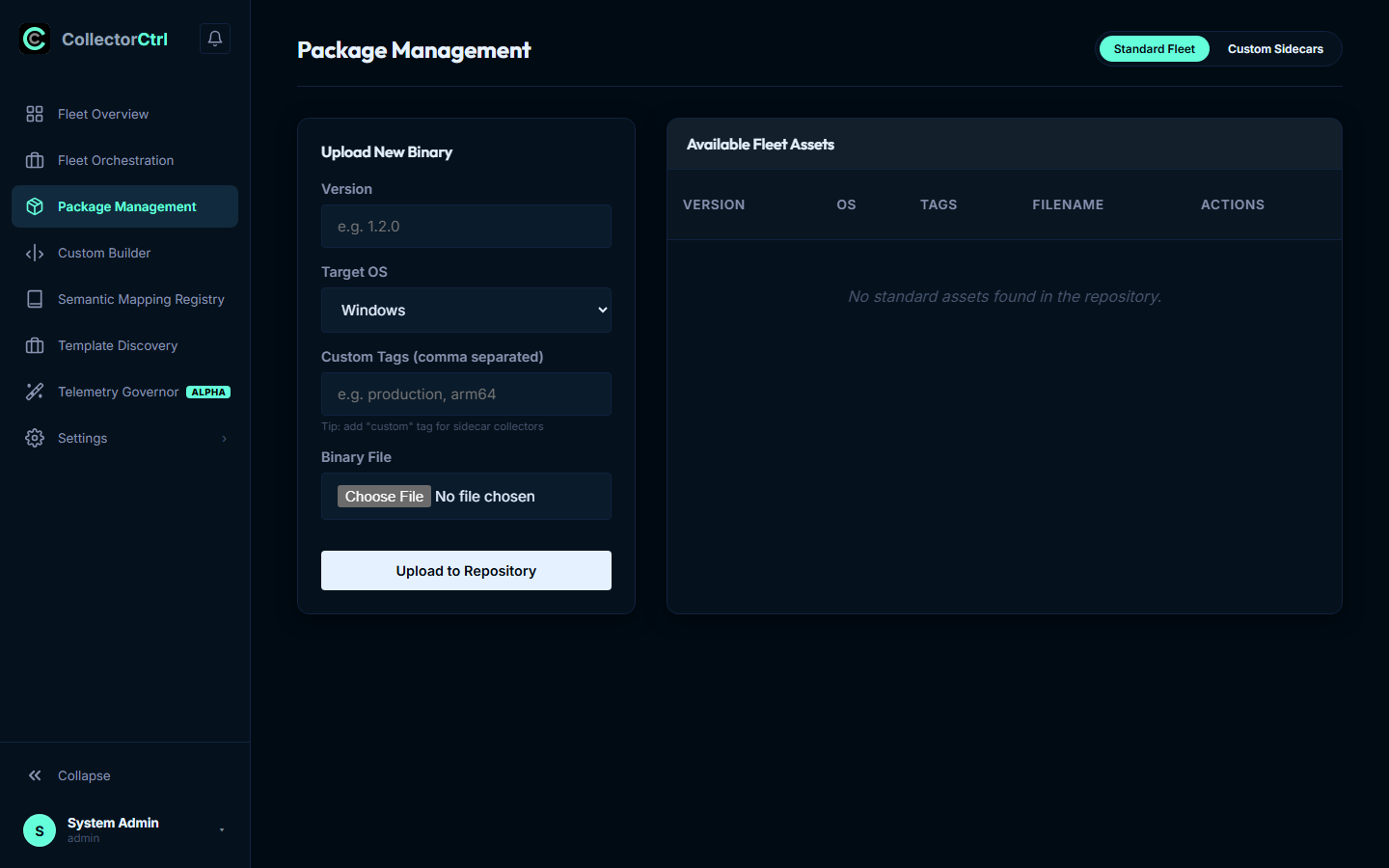 Expand
2. Package Registry Structure: Main vs. Sidecar Collectors
The Package Management console organizes collector binaries into two distinct registry categories:
A. Main Collector Packages (Standard Fleet)
The Main Collector binary is the primary OpenTelemetry worker process managed by the Supervisor on target hosts. It is responsible for the heavy lifting of general observability data:
- Ingesting high-throughput host metrics (
hostmetricsreceiver), Windows Event Logs, and Linux system logs. - Ingesting application telemetry via standard OTLP (
port 4317gRPC /port 4318HTTP). - Running core batching, memory limiters, and routing to primary observability platforms (Datadog, Splunk, Dynatrace, ClickHouse, Prometheus).
B. Sidecar Collector Packages (Custom Sidecars)
A Sidecar Collector is a secondary, specialized OpenTelemetry Collector binary deployed alongside the main collector on the same host and managed concurrently by the Supervisor daemon.
3. Strategic Purpose of Main vs. Sidecar Collectors
- Main Collector: The primary workforce on the host handling standard APM traces, system metrics, and application logs.
- Sidecar Collector: A purpose-built, secondary collector deployed alongside the main collector to segregate distinct data streams (e.g., SIEM security audits or AI/LLM telemetry) or to bridge proprietary vendor gaps.
Common Sidecar Use Cases
-
Pipeline Segregation for SIEM & Security Audits:
Compliance standards (such as PCI-DSS, HIPAA, or SOC 2) often mandate that sensitive security audit logs and authentication traces remain strictly separated from general application performance metrics. A custom sidecar collector can run isolated memory queues, dedicated encryption keys, and independent export routes to the corporate SIEM (e.g., Splunk HEC or Microsoft Sentinel) without risk of telemetry bleed or bottlenecking production observability pipelines. -
LLM & AI Pipeline Segregation:
High-token AI prompt/completion traces and semantic model evaluations require specialized processing, token cost tracking, and PII masking. Running an AI-specific sidecar prevents heavy payload processing from disrupting baseline infrastructure metrics. -
Avoiding Vendor Lock-In & Swift Telemetry Migration (Real-World Scenario):
Consider an enterprise running the Splunk OpenTelemetry Collector distribution across 5,000 servers. Splunk's distribution intentionally omits third-party vendor exporters (such as the Coralogix exporter).Suppose the organization decides to migrate or dual-stream telemetry to Coralogix. Coralogix requires a dedicated, tightly coupled
coralogixexporter(for proprietary subsystem routing, metadata enrichment, and backend protocol optimizations)—a generic OTLP exporter is insufficient, and Coralogix officially recommends its dedicated exporter.The Traditional Problem: Ripping out the installed Splunk agent across 5,000 production servers and installing another distribution is a massive, high-risk operational overhaul that can cause telemetry blind spots and service interruptions.
The CollectorCtrl Sidecar Solution:
The CollectorCtrl Sidecar Solution: Zero-Downtime Decoupling
Dual-shipping & vendor migration via in-memory localhost loopback (127.0.0.1:4319)
Dual-Shipping LiveApplication Microservices & Host Workloads
Kubernetes Pods, VMs, & bare-metal container runtimes
:4317 gRPC:4318 HTTPOTLP Ingress (Traces, Metrics, Logs)Host Server / VM Boundary (Linux / Windows / K8s Node)Supervised by CollectorCtrl Agent (PID 1042)Primary ProcessMain Collector
Splunk OTel Distro v0.108
Ingests:OTLP & hostmetricsSinks:splunk_hec + otlp/sidecarLocalhost IPC127.0.0.1:4319Zero-Latency BridgeCustom OCBSidecar Collector
Custom OCB Binary v1.4
Receiver:otlp (:4319 gRPC)Exporter:coralogixexporterCollectorCtrl Supervisor Watchdog: Independent process supervision, probationary health probes (:13133), and automated rollbacks with zero host reboots.Memory Limit: 128 MBRecovery: Auto-RestartActive / UninterruptedSplunk Cloud / Enterprise HEC
Existing Production Telemetry Sink
Parallel Stream ValidatedCoralogix SaaS Platform
Target Migration & Streaming Analytics
Main Collector (Splunk Distribution)
Heavy-lifting host telemetry daemon & OTLP ingress gateway
Main Process (PID 2410)The primary collector binary running on the host (e.g., Splunk OpenTelemetry Collector or upstream). It continues gathering host metrics, system logs, and application traces. Instead of undergoing a risky full uninstall, its pipeline is simply augmented to fork an OTLP stream to the local sidecar at 127.0.0.1:4319.
Binary Footprint~165 MB (Full vendor distribution)Ingress Endpoints:4317 (gRPC), :4318 (HTTP), hostmetricsMemory Threshold512 MB memory_limiterEgress ChannelsPrimary: splunk_hec | Loopback: otlp/sidecarRisk ProfileZero modification to host binary package/etc/otelcol/config.yaml (Main Collector)receivers: otlp: protocols: grpc: { endpoint: "0.0.0.0:4317" } http: { endpoint: "0.0.0.0:4318" } hostmetrics: scrapers: { cpu: {}, memory: {}, load: {} } exporters: # 1. Existing Production Sink (Untouched) splunk_hec: token: "${SPLUNK_HEC_TOKEN}" endpoint: "https://http-inputs.splunk.corp:8088/services/collector" # 2. Localhost Bridge to Sidecar otlp/sidecar: endpoint: "127.0.0.1:4319" tls: insecure: true service: pipelines: metrics: receivers: [otlp, hostmetrics] processors: [memory_limiter, batch] exporters: [splunk_hec, otlp/sidecar] logs: receivers: [otlp] processors: [memory_limiter, batch] exporters: [splunk_hec, otlp/sidecar]Zero Host Reinstalls
Keep existing Splunk binaries untouched across 5,000+ nodes; eliminate rip-and-replace risks.
Zero Wire Latency
127.0.0.1:4319 loopback stays in host memory buffers; zero NIC egress costs or external exposure.
Zero Telemetry Gaps
Parallel dual-shipping validates metric, trace, and log parity before decommissioning the old sink.
Zero Vendor Lock-In
Inject any missing vendor exporter or AI processor via CollectorCtrl OCB without waiting for vendor roadmaps.
- Use CollectorCtrl's Custom Binary Builder to compile a minimal collector containing only
otlpreceiverandcoralogixexporter. - Upload the binary to the Sidecar Collector Registry in Package Management.
- In Fleet Orchestration, enable the sidecar collector on the target nodes.
- Update the Main Collector's YAML configuration to add an OTLP exporter targeting
localhost:4319(the sidecar's receiver). - The sidecar receives the telemetry locally and dispatches it directly to Coralogix via
coralogixexporter.
Result: The migration is achieved instantly with zero downtime, zero host-level package uninstalls, and complete avoidance of vendor lock-in.
- Use CollectorCtrl's Custom Binary Builder to compile a minimal collector containing only
4. Storage & Binary Validation
CollectorCtrl enforces rigorous security and compatibility gates before any executable binary is accepted into the registry:
Magic-Byte Executable Inspection
When a binary is uploaded, CollectorCtrl inspects its initial magic bytes:
- PE32/PE32+: Verified for Windows executables (
.exe). - ELF (Executable and Linkable Format): Verified for Linux systemd daemons.
- Mach-O: Verified for macOS hosts.
This inspection immediately rejects corrupt uploads, truncated zip archives, or non-executable scripts.
Target OS & CPU Architecture Dimensions
Binaries must match the target operating system (linux, windows, darwin) and processor architecture:
amd64(x86_64)arm64(AArch64)Any / Universal
The registry prevents accidental misconfigurations (e.g., assigning a Linux ARM64 binary to Windows AMD64 hosts).
Cryptographic SHA-256 Hashing
The server calculates and records an SHA-256 cryptographic checksum upon upload. Target Supervisors download packages over TLS, calculate the local file hash, and verify it against the server signature before executing any process swap.
5. Integration with Fleet Orchestration: Coordinated Rollouts
Package Management works hand-in-hand with Fleet Orchestration. While the package registry stores and validates your binaries, Fleet Orchestration manages how and when those binaries are deployed across your infrastructure.
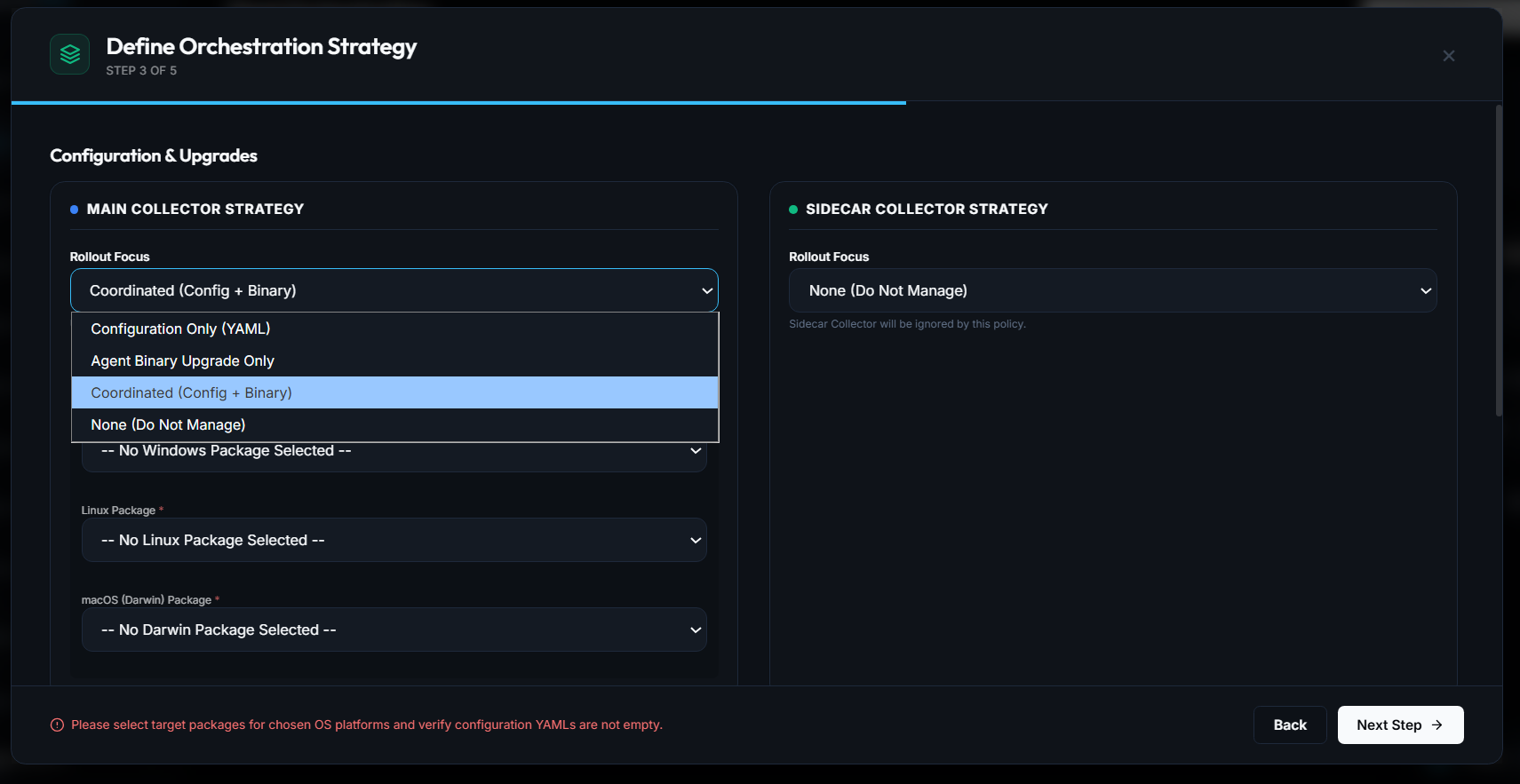 Expand
The Breaking Change Problem (v0.100 to v0.105)
Upgrades between OpenTelemetry Collector minor versions (for example, stepping from v0.100.0 to v0.105.0) frequently introduce breaking changes to YAML schemas:
- Processors deprecated or restructured (e.g., changes to
transformstatements orfiltersyntax). - Component names or configuration keys renamed.
- Stricter unmarshaling validations rejecting previously tolerated syntax.
If an administrator deploys a new collector binary while the host continues to feed it old YAML, the new binary fails pre-flight validation and crash-loops. Conversely, deploying new YAML syntax to an older binary causes startup parser failures.
The Solution: Coordinated Rollout Focus
To solve this dependency trap, CollectorCtrl provides the Coordinated (Config + Binary) rollout focus in Fleet Orchestration:
- Atomic Payload Delivery: CollectorCtrl packages the new collector binary from the Package Registry together with its matching, updated YAML configuration into a single synchronized OpAMP payload.
- Pre-Flight Validation Gate (
otelcol validate): The Supervisor extracts the new binary to a temporary path and runs dry-run syntax validation against the new YAML:/tmp/new-otelcol --config /tmp/new-config.yaml validate - Atomic Process Swap: If validation passes:
- The Supervisor backs up the active binary to
.bak. - Swaps in the new executable and updates
/etc/otelcol/config.yaml. - Restarts the collector worker process.
- The Supervisor backs up the active binary to
- 60-Second Health Probation & Fallback Watchdog:
The Supervisor monitors the new collector for 60 seconds. If the new process crashes or fails to returnHTTP 200on the health check endpoint (:13133), the Supervisor aborts the upgrade, restores the.bakbinary and previous working configuration, and reports a validation failure back to the console with zero loss of telemetry data.
6. Summary of Best Practices
- Use OCB for Lightweight Footprints: Instead of distributing large vendor builds with hundreds of unused components, compile a custom binary containing only your active pipeline components using the Custom Binary Builder.
- Tag Binaries Clearly: Include version tags (e.g.,
v0.108.0,production,coralogix-sidecar) during upload to simplify identification in Fleet Orchestration. - Always Test in Canary Rings: When publishing binary updates via Fleet Orchestration, select Canary Rollout (10%) before promoting to 100% of the fleet.
- Use Coordinated Rollouts for Schema Steps: Whenever upgrading across versions with YAML syntax adjustments, always select Coordinated (Config + Binary) focus.
Next Steps
- Fleet Orchestration & Policies — Create automated canary rollouts for collector packages
- Custom Binary Builder — Build tailored OpenTelemetry binaries directly in the UI
- Fleet Overview & Central Control — Inspect active binary versions and effective configs
- Upgrade Supervisor Agents — Manage host supervisor daemons under Settings