 CollectorCtrl
OpenTelemetry Collector Builder (OCB) from the UI
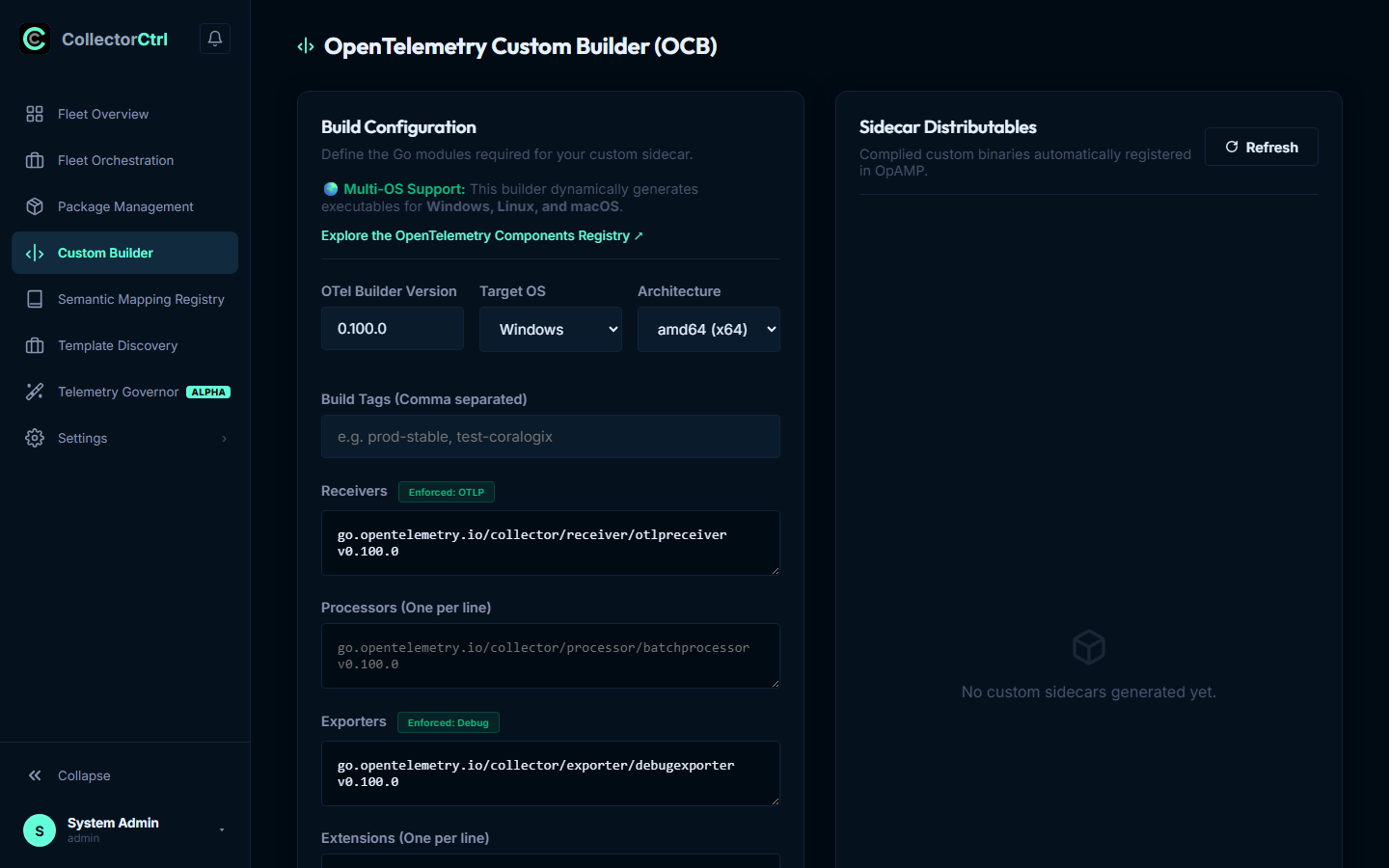
CollectorCtrl features a built-in compilation engine powered by the OpenTelemetry Collector Builder (OCB). Infrastructure, Platform, and DevOps teams can assemble, compile, and distribute custom OpenTelemetry Collector binaries directly from the web console without requiring local Go toolchains, compilation dependencies, or container build farms.
 Expand
Standard upstream OpenTelemetry Contrib distributions compile in hundreds of community plugins, resulting in large binaries (>160 MB) with substantial memory footprints.
Using CollectorCtrl's Custom Builder lets you select only the specific receivers, processors, exporters, extensions, and connectors required for your architecture. This reduces memory footprint by up to 65%, eliminates unneeded CVE attack vectors, and prevents package drift.
1. Why Build Custom Collector Binaries?
Minimal Memory & CPU Overhead
Vendor Independence & Custom Exporters
Streamlined Security Audits
Statically Linked Multi-OS Binaries
2. Component Discovery via OpenTelemetry Registry
When customizing an OpenTelemetry Collector, you can incorporate any receiver, processor, exporter, extension, or connector developed by the OpenTelemetry project or third-party vendors.
 Expand
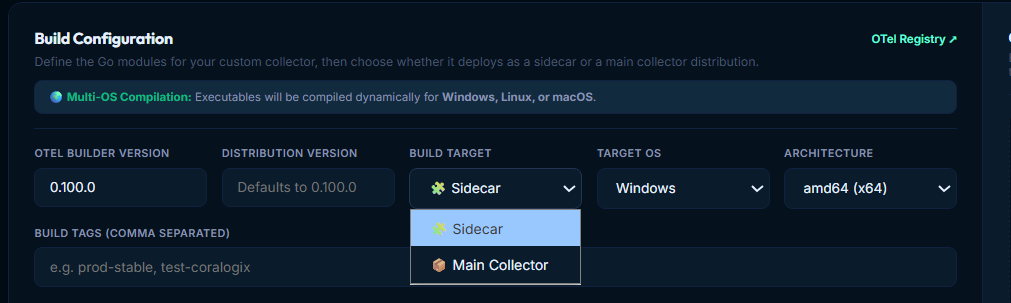
To discover available components and their exact Go module paths, click the OTel Registry ↗ link in the top-right corner of the Build Configuration card, or visit the official repository directly:
👉 OpenTelemetry Ecosystem Registry
The registry catalogs hundreds of community-maintained components. When adding a component to your build, provide the fully qualified Go module path and matching semantic version:
- Receiver Example:
go.opentelemetry.io/collector/receiver/otlpreceiver v0.100.0 - Processor Example:
go.opentelemetry.io/collector/processor/batchprocessor v0.100.0 - Exporter Example:
github.com/open-telemetry/opentelemetry-collector-contrib/exporter/coralogixexporter v0.100.0 - Connector Example:
github.com/open-telemetry/opentelemetry-collector-contrib/connector/spanmetricsconnector v0.100.0 - Extension Example:
github.com/open-telemetry/opentelemetry-collector-contrib/extension/basicauthextension v0.100.0
Version Compatibility Rule
Always ensure that the version tag specified on each Go module (e.g., v0.100.0) matches the OTel Builder Version selected in the configuration form. Mismatches across major OpenTelemetry Collector core revisions may lead to Go module dependency resolution failures during compilation.
3. Build Targets: Main Collector vs. Sidecar
A key capability of CollectorCtrl's Custom Builder is selecting the architectural Build Target:
Build Configuration ──────────────────────────┐
                                              ▼
                                   ┌──────────────────────┐
                                   │  BUILD TARGET FIELD  │
                                   └──────────┬───────────┘
                         ┌────────────────────┴────────────────────┐
                         ▼                                         ▼
              [ 📦 Main Collector ]                       [ 🧩 Sidecar ]
                         │                                         │
                         ▼                                         ▼
            Registered in Package Mgmt:               Registered in Package Mgmt:
            Main Collector Packages                   Sidecar Collector Packages
                         │                                         │
                         ▼                                         ▼
            Assigned as Primary Agent                 Assigned via Localhost Bridge
            Worker across Fleet Nodes                 (:4319) under Supervisor Watchdog
Option A: 📦 Main Collector
- Purpose: Serves as the primary telemetry collection process running on the host or VM.
- Scope: Ingests host-level metrics (
hostmetricsreceiver), Windows Event Logs, syslog, and application OTLP traffic (:4317gRPC /:4318HTTP). - Package Destination: Automatically cataloged under Package Management → Main Collector Packages.
- Use Case: Creating a lean, tailored corporate baseline collector containing only your enterprise-approved exporters (e.g., Prometheus, Datadog, Splunk) without the bloat of hundreds of unused Contrib modules.
Option B: 🧩 Sidecar
- Purpose: Serves as an auxiliary, purpose-built collector deployed alongside the main collector on the same host and managed concurrently by the Supervisor daemon.
- Scope: Communicates with the main collector via local in-memory loopback (
127.0.0.1:4319) with sub-millisecond latency and zero physical wire egress cost. - Package Destination: Automatically cataloged under Package Management → Sidecar Collector Packages.
- Use Case: Dedicated vendor migrations (e.g., streaming to Coralogix via
coralogixexporterwhile keeping an existing Splunk agent untouched), SIEM compliance segregation, or LLM token analytics.
4. Build Configuration Parameters
The builder interface provides granular control over compilation flags and binary metadata:
| Form Field | Options / Format | Description & Operational Purpose |
|---|---|---|
| OTEL BUILDER VERSION | e.g. 0.100.0, 0.108.0 | The version of the underlying ocb compiler binary executed by CollectorCtrl. |
| DISTRIBUTION VERSION | e.g. 0.100.0-prod or 1.0.0 | Semantic version string embedded into the compiled binary. Defaults to the builder version if left blank. |
| BUILD TARGET | Sidecar or Main Collector | Directs the compiled artifact into either the Sidecar or Main registry in Package Management upon completion. |
| TARGET OS | Windows, Linux, macOS | The target operating system. Multi-OS compilation is performed dynamically via Go cross-compilation. |
| ARCHITECTURE | amd64 (x64), arm64 (AArch64) | The CPU instruction set for the destination hardware (x86_64 servers, AWS Graviton, Apple Silicon, etc.). |
| BUILD TAGS | Comma-separated strings | Arbitrary tags (e.g. prod-stable, test-coralogix, pci-audit) attached to the binary for filtering in Fleet Policies. |
Enforced Baseline Components
To guarantee system stability and compatibility with CollectorCtrl features, the builder automatically enforces two essential components:
- Enforced Receiver (
otlpreceiver): Guarantees that the binary can always ingest OpenTelemetry protocol traffic over standard ports (:4317gRPC /:4318HTTP) or local loopback (:4319). - Enforced Exporter (
debugexporter): Guarantees that pre-flight syntax checks (otelcol validate) and localized verbose logging can execute without missing exporter errors.
5. End-to-End Build & Deployment Lifecycle
1. Configure Build Parameters & Components
Specify the OTel builder version, target OS (Linux, Windows, macOS), CPU architecture (amd64, arm64), and choose your build target (Main Collector vs Sidecar). Enter the desired Go module dependencies for your receivers, processors, exporters, extensions, and connectors.
2. Execute Compilation Engine
Click Build Collector. CollectorCtrl generates a standardized OCB manifest (builder-config.yaml) and triggers the compilation pipeline in an isolated worker sandbox:
dist:
name: otelcol-custom
description: Enterprise Custom OTel Collector
version: 0.100.0
output_path: /opt/collectorctrl/builds/dist

receivers:
- gomod: go.opentelemetry.io/collector/receiver/otlpreceiver v0.100.0
- gomod: github.com/open-telemetry/opentelemetry-collector-contrib/receiver/hostmetricsreceiver v0.100.0

processors:
- gomod: go.opentelemetry.io/collector/processor/batchprocessor v0.100.0
- gomod: go.opentelemetry.io/collector/processor/memorylimiterprocessor v0.100.0

exporters:
- gomod: go.opentelemetry.io/collector/exporter/debugexporter v0.100.0
- gomod: github.com/open-telemetry/opentelemetry-collector-contrib/exporter/coralogixexporter v0.100.0

extensions:
- gomod: github.com/open-telemetry/opentelemetry-collector-contrib/extension/healthcheckextension v0.100.03. Real-Time Compiler Streaming Console
Monitor stdout and stderr live in the terminal drawer as the Go compiler downloads dependencies (go get), runs code generation, links static binaries, and validates symbols. Typical compilation completes in 35–60 seconds.
4. Automated Package Registration (Zero Manual Upload)
Once compilation finishes with exit code 0:
- The server calculates a cryptographic SHA-256 hash of the executable.
- The binary is automatically cataloged in Package Management under the chosen registry (Main Collector Packages or Sidecar Collector Packages).
- Metadata such as OS, CPU architecture, version, upload timestamp, and build tags are indexed.
- No manual file downloading, copying, or re-uploading is ever needed.
5. Immediate Availability in Fleet Orchestration
The compiled binary is immediately selectable in Fleet Orchestration:
- Main Collector Upgrades: Select the new binary during canary rollouts or coordinated upgrades.
- Sidecar Deployments: Attach the custom sidecar binary to targeted nodes running vendor distributions to unlock missing exporters instantly.
6. Distributables & Registry Management
The Distributables table on the right side of the Custom Builder interface provides an active view of all binaries generated by the builder:
| Column | Information Displayed |
|---|---|
| VERSION & OS | Semantic version (e.g. 0.100.0) and target OS (linux, windows, darwin). |
| FILENAME & TAGS | Unique hash-suffixed filename (e.g. 0.100.0-e15e33cb-otelcol-custom.exe), OS badge (amd64/arm64), type badge (custom), and short SHA-256 fingerprint. |
| UPLOADED AT | Timestamp when the build completed and was published to the local mirror. |
| ACTIONS | Direct deletion/purge icon to retire deprecated builds and reclaim server disk space. |
Summary of Best Practices
- Pin Exact Component Versions: Always specify exact semantic version tags (e.g.,
v0.100.0) rather than floating@latesttags to ensure build reproducibility. - Consult the OTel Registry: Use the OTel Registry ↗ link whenever you need component names, configuration examples, or exporter capabilities.
- Select Sidecar for Surgical Enhancements: If your primary fleet is already running an established vendor agent (like Splunk or ADOT), build a Sidecar rather than replacing the main agent.
- Leverage Build Tags for Staging: Tag new builds with tags like
canary-testorstage-v1so you can target them to specific agent groups in Fleet Orchestration before rolling out globally.
Next Steps
- Package Management & Binary Registry — Inspect registered Main and Sidecar packages
- Fleet Orchestration & Policies — Deploy custom binaries via Canary and Coordinated rollouts
- Fleet Overview & Central Control — Inspect active binary versions and process health across nodes
- Upgrade Supervisor Agents — Manage host daemon supervisors under Settings